Taxonomies & routing
Class trees, routing versus label taxonomies, how class codes are derived, the class-to-schema mapping, routing coverage, and what happens to a document that matches no class.
A taxonomy is the tree of document classes a pipeline sorts documents into. Its shape is a hierarchy of classes; its behaviour depends on whether the classes route to schemas. The Classify stage resolves each document to a class in the published taxonomy its pipeline is bound to.
Routing taxonomies vs label taxonomies
A routing taxonomy binds classes to schemas, so classifying a document also decides which schema extracts it — classification and extraction are one decision. A label taxonomy classifies without routing: the class is recorded on the document but drives no schema selection. The same tree structure serves both; a label taxonomy has no Routing view, and its classes carry no schema bindings.
Class codes and how they are derived
Every class has a code — a short, stable key for the class. When a class is added in the editor, its code is derived from its label and its parent's code: a top-level Invoice class takes INV, and its child Standard invoice takes INV.SI. A code that clashes with a sibling's gets a numeric suffix, such as INV2. The creation flows offer their own code schemes as well — derived from the path, the name, a slug, or a sequence. The code is read-only in the class inspector, and a version that changes a class code is flagged as a breaking change when it is published.
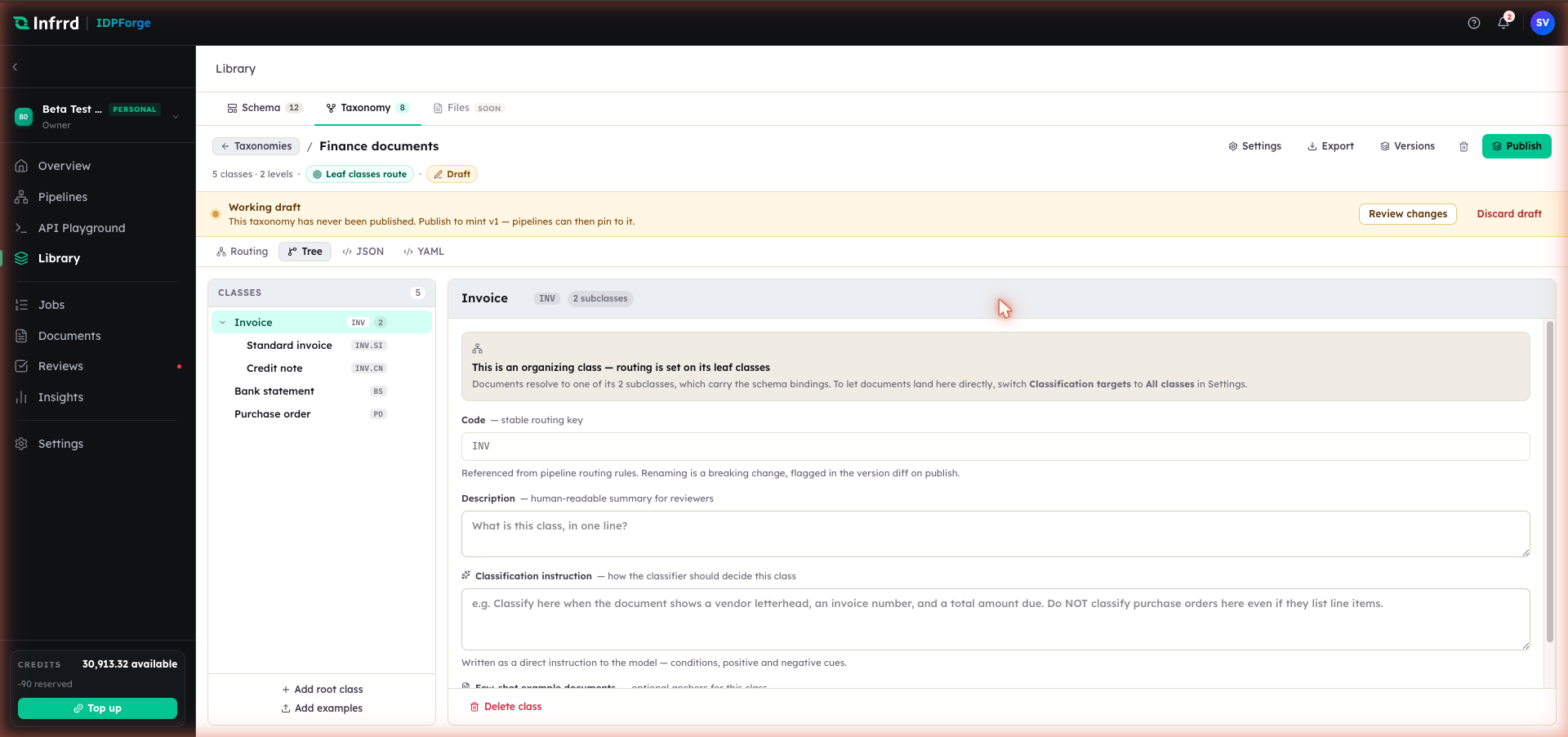
Each class carries a read-only code, a description — which the classifier sees alongside the class label — and a classification instruction. Invoice here is an organizing class: under leaf-only targeting, its two subclasses carry the schema bindings.
Mapping classes to schemas — no inheritance
In a routing taxonomy each target class binds its own schema, and there is no inheritance from a parent. By default only leaf classes are targets; a parent organizes its children and carries no binding. Setting Classification targets to All classes makes every class a target that can bind its own schema. Two sibling leaves under the same parent can route to entirely different schemas; nothing is inferred from the branch they share. A binding either pins a published schema version or tracks the latest published version.
When a pipeline binds the taxonomy, one routing rule is generated per class from its binding. The rule matches the classified path by class label. A class with no schema bound gets a rule with no schema, so its documents are extracted generically.
Routing coverage
The Routing view counts the classes routed against the total and shows the share as a progress bar. A class counts as routed only when it binds a published schema. Unbound classes are reported as using generic extraction, and classes bound to an unpublished schema are warned about separately.
Where an unbound class's name shares words with a published schema's name, the view offers that binding as a suggestion. Background enrichment from sample documents can suggest a binding too; it stays marked as suggested until it is confirmed.
Coverage does not gate publishing: a taxonomy with unbound classes publishes, and those classes extract generically. The only publish gate is enrichment — publish is unavailable while an enrichment run is in progress or has failed.
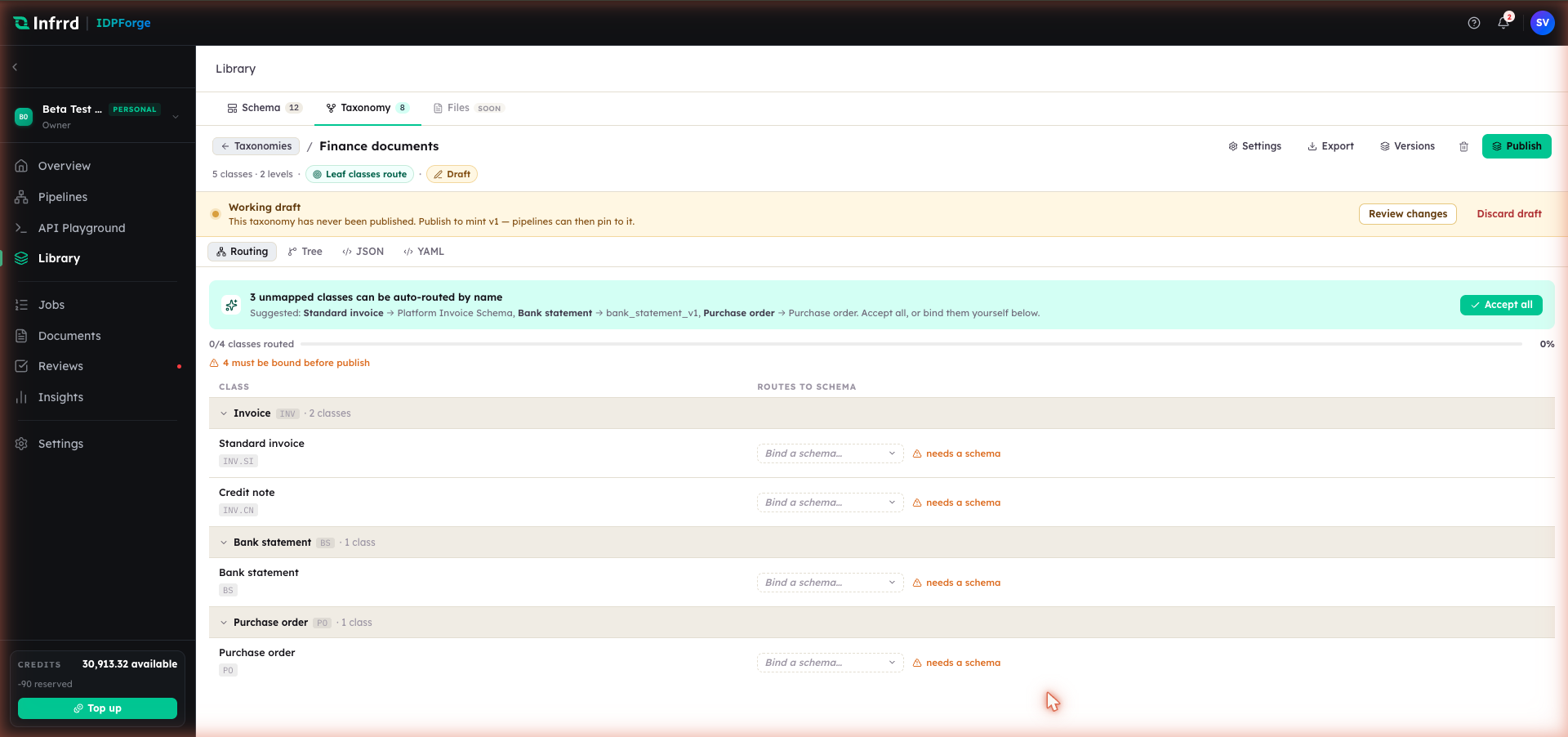
The Routing view with its name-match suggestion banner and coverage bar. A class counts as routed only when it binds a published schema; unbound classes do not block publish and are extracted generically.
Starting points
A taxonomy can be built from any of several starting points, each of which produces the same editable tree. They differ only in how the first draft is seeded, and one is not yet available.
| Starting point | Produces | Status |
|---|---|---|
| Upload a folder | Nested folders become classes; sample docs enrich them | Available |
| Generate from schemas | One class per published schema, pre-routed | Available |
| Paste an outline | Indented text becomes a tree with derived codes | Available |
| Infer from samples | Clusters mixed documents into a proposed tree | Coming soon |
The per-option settings for each — how class names and codes are derived, how sample documents are attached — belong to the authoring flow in Create a taxonomy.
Documents that match no class
A document whose classification matches no class in the taxonomy is not failed. It is recorded with the fallback class Others, which routes to no schema, and is extracted generically — Extract returns the fields, tables and figures it finds rather than schema-validated fields — so an unexpected document still produces a result rather than an error. A document whose class has no schema bound is extracted the same way. How a document is resolved to a class in the first place is covered in Classify.