Credits
IDPForge meters work in credits, not pages. Every job reserves credits up front, settles to what it actually used, and returns the rest — and a failed job costs nothing.
Credits, not pages
IDPForge charges in credits. A credit is a unit of compute, so a dense page that needs a larger model costs more than a simple one. There is no page allowance and no daily page limit: page count only feeds a small flat platform charge on each job, and the rest of the charge follows the compute the job actually used. Your balance, what is reserved, and what each pipeline and stage consumes are all shown on the billing dashboard in Settings → Billing.
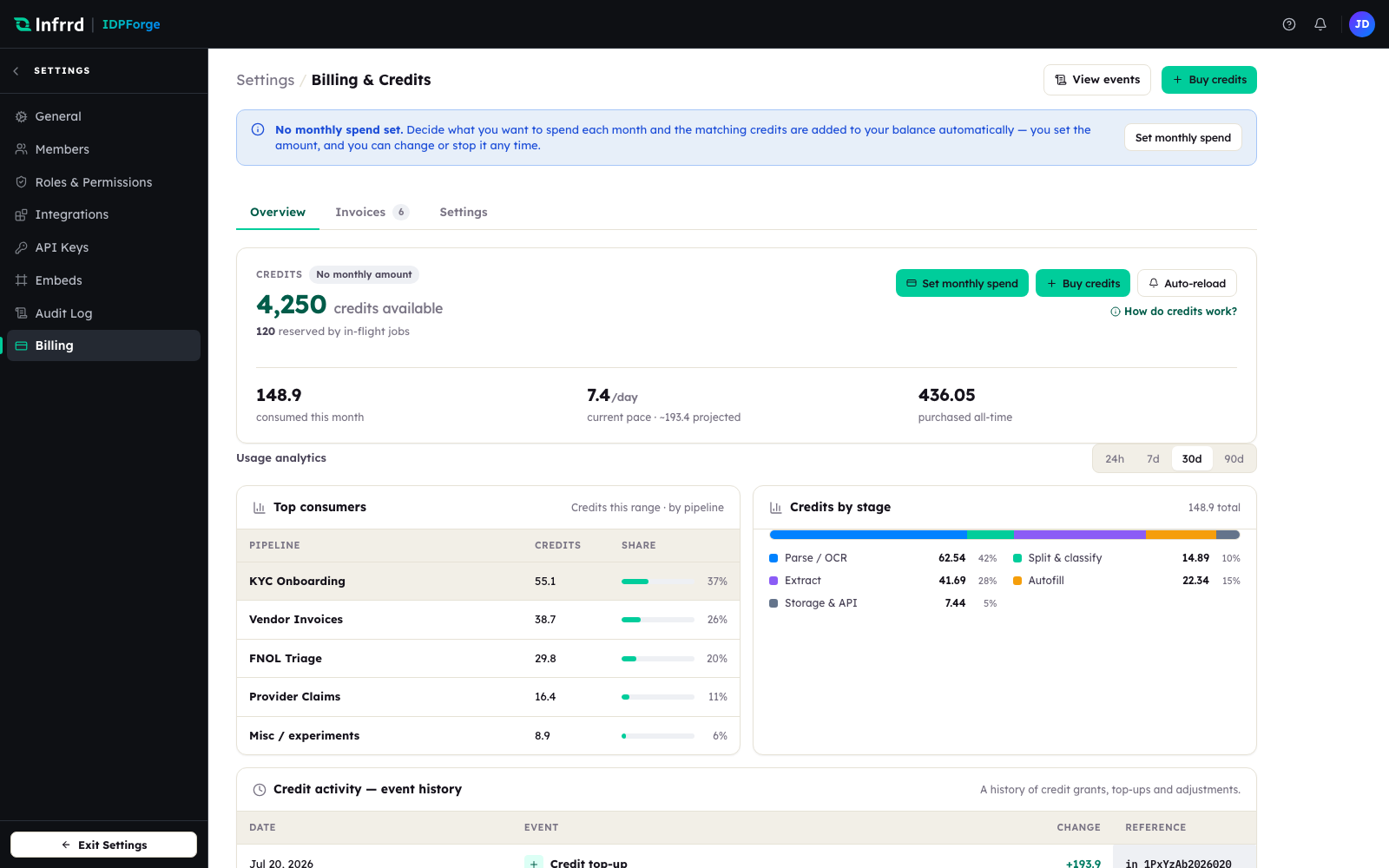
The billing dashboard. The credits card shows credits available and credits reserved by in-flight jobs; the usage analytics below break consumption down by pipeline and by stage.
What a job is charged
A settled job's charge has two parts: a flat platform charge per page, and the LLM surcharge for the model calls the job made, plus Azure Document Intelligence processing where the pipeline uses it. Calls that run on your own provider key carry no LLM surcharge — see Bring your own key.
Reserve, settle, release
Every job moves through the same three steps.
Because the charge is capped at the reservation, a job can never cost more than it reserved. Test runs reserve and settle exactly like production jobs.
How each outcome is charged
What happens to a job's reservation depends on how the job ends.
| Job outcome | Reservation |
|---|---|
| Completed | Settled — charged the actual cost; the remainder is released. |
| Completed with errors | Settled — charged for the work done, like a completed job. |
| Cancelled | Settled — charged for the work done before the cancel; the remainder is released. |
| Failed | Released in full — a failed job costs nothing. |
| Blocked or partial | Held until the job is re-run, discarded, or the hold expires — see Held credits below. |
When the balance is empty
A reservation needs a sufficient balance. When there is not enough, the submission is rejected with HTTP 402 Payment Required and no job is created — nothing is queued to run later against credits you do not have. See Submit a job.
How consumption is metered
Consumption is tracked per stage, so the dashboard's Credits by stage card can show where credits go — Parse / OCR, Split & classify, Extract, Autofill, and Storage & API. This is why a pipeline that only classifies costs a fraction of one that extracts every field.
Free and paid credits
Your balance holds free and paid credits, and free credits are always spent before paid ones. Overage, when you turn it on, is a third source used only once both run out.
| Kind | Where it comes from | Behaviour |
|---|---|---|
| Free | A one-time grant when the workspace is created. | Spent first. Not renewed. |
| Paid | Your monthly spend, granted each billing cycle, plus any top-ups and auto-reloads. Granted on the full amount paid — no payment-processing fee is deducted. | Pooled into one balance and carried over from cycle to cycle rather than expiring. Turning off a monthly spend leaves the credits you hold in place. |
| Overage | Only when you turn overage on and set a dollar limit. | Used only after free and paid credits run out — see Overage below. |
Held credits
A job that stops midway — blocked or partial — holds its reservation so a fix-and-re-run can resume it rather than paying twice. Held credits come back in one of three ways:
- Discard & release credits on the job's detail page ends that one job.
- Release all held credits on the banner above the Jobs list ends every held job at once.
- Automatically, once a job has been held longer than the hold period — three days by default.
Each path marks the held job failed, so it can no longer be re-run; only its reserved credits are returned.
Overage
Overage is off until you turn it on and set a per-cycle dollar limit on the Settings tab of Settings → Billing. With a limit set, once your free and paid credits are exhausted, jobs can keep running on overage credits up to that limit, and the overage you use is billed at cycle close. A job larger than the remaining overage allowance is still rejected with 402. With overage off, an empty balance returns 402.
Separately, a Monthly spend cap on the same tab rejects new jobs with 402 once that many credits have been used in the month.
An auditable ledger
Every grant, top-up, reservation, settlement, release, and adjustment is written to an append-only credit ledger, and each settlement records the pricing that applied to the job. The Credit activity card on the dashboard shows the grants, top-ups, auto-reloads, releases, and adjustments from that ledger; per-job charges are in Insights → Credits and on each job's detail page.