Split and classify
Split finds where one uploaded file stops being one document and starts being the next; Classify decides what type each document is and routes it to an extraction schema. They share one stage card and one taxonomy, but each is an independent sub-stage with its own toggle.
Split and Classify are two sub-stages of one pipeline stage. Split turns a single file that holds several documents into one child document per document. Classify decides what each document is — an invoice, a bank statement, a KYC form — against the taxonomy the pipeline binds, and uses that answer to pick the extraction schema Extract will run.
They share one stage card and one bound taxonomy, but each has its own toggle: a pipeline can split without classifying, classify without splitting, or do neither. Each is a first-class configuration, not a workaround.
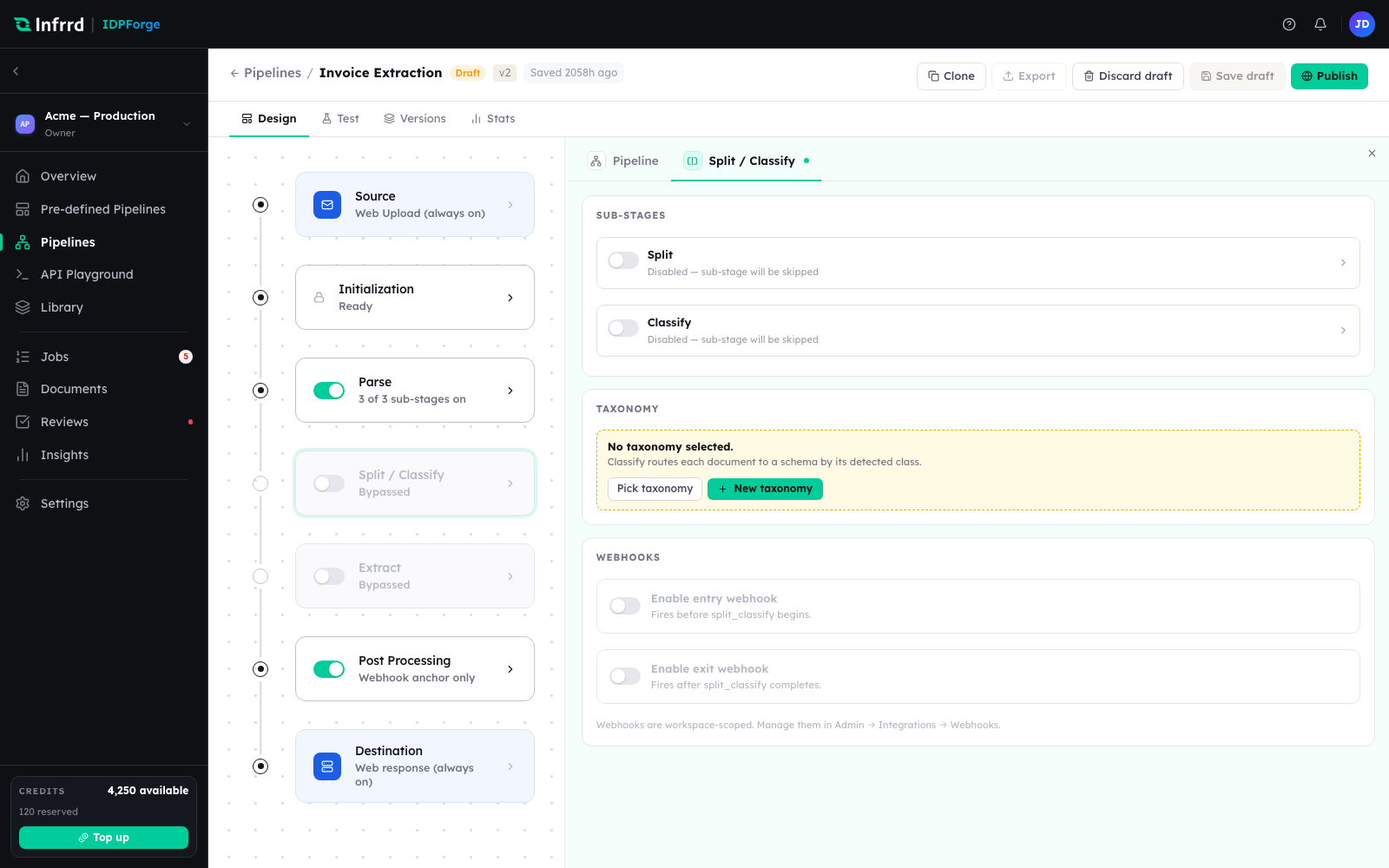
The Split / Classify stage. Split and Classify are separate sub-stages under one card; either can run without the other, and the taxonomy chosen here is shared by both.
Split
What Split answers
A single uploaded file is often a stack of documents — a scanned batch, or one PDF that bundles an invoice with its packing slip and a statement. Split finds the boundaries between those documents and turns each segment into its own child document. Everything after Split — Classify, Extract — runs once per child, not once per file.
How boundaries are found
Split reads the page images rendered during Initialization. It is visual, so it does not wait on OCR text. A model returns the segments as page ranges, each carrying a confidence and an informal document-type hint, with up to three runner-up labels for that hint. The hint and its alternatives are informational; the class that drives routing comes from Classify.
When there are no page images, the model call fails, or it returns no segments, Split falls back to a single segment covering the whole file rather than failing the job.
The boundaries are checked for coverage — contiguous, in order, and every page in exactly one segment — but the check is advisory: a questionable split is logged, never a reason to fail the job. Wrong boundaries are a judgement a person can fix after the fact; a hard failure would throw away the work already done.
Separate and fused
Split and Classify can run as two passes or one.
- Separate — Split finds boundaries, then Classify decides each segment's type in its own pass.
- Fused — a single pass returns boundaries and the class of each segment together. Fused applies only when Split is bound to exactly one taxonomy and the file is within the fused page limit, 50 pages by default; otherwise the pipeline falls back to the separate path.
Outputs
Split produces one child document per segment, each with its own page range, plus a record of the boundaries and their confidences. Those children are what Classify and Extract operate on; a single-segment file carries straight through.
Low split confidence and review
Low boundary confidence never fails a job. By default it is only logged and the pipeline keeps moving.
When Send exceptions to Reviews is on for the Split / Classify stage, a boundary with confidence below 0.7 raises a split_boundary review instead, and the document waits in the pipeline's review queue for a person to confirm or correct the cut. In fused mode, a segment classification below 0.7 raises split_classify. The single-segment fallback is never treated as low confidence. See Exceptions & human review.
Classify
What Classify answers
Classify decides what a document is according to the taxonomy the pipeline binds, and uses that answer to pick the extraction schema Extract will run. It operates on each document Split produces, or on the whole file when Split is off.
Taxonomies and routing
A taxonomy is the tree of classes a document can be sorted into. The Split / Classify stage binds one published taxonomy, and Split and Classify share it. Classify sends the document's page images and the taxonomy tree — each class's label and description — to a vision model, which returns a class path, root to leaf, with a confidence at each level, plus up to three alternative labels. The lowest confidence along the path is the classification's confidence. In fused mode, classification comes from the same model call as Split and uses the Split model.
Routing rules turn that class into a schema. They are generated for the pipeline from the taxonomy's class-to-schema bindings and evaluated in priority order. The first matching rule wins. See Taxonomies & routing.
When no rule matches, or the matching class has no schema bound, the document has no resolved schema. That is a valid outcome, not an error: Extract falls back to its generic mode and returns whatever structure it can find. The same happens when the model's answer matches no class in the taxonomy — the document is recorded with the fallback class Others, which routes to no schema. See Extract.
Low confidence and review
A classification whose confidence falls below the stage's confidence threshold is low-confidence. The threshold is set on the Classify sub-stage; when it is not set, the taxonomy's own low-confidence threshold applies, then a platform default of 0.7.
What happens to a low-confidence document depends on the stage's Send exceptions to Reviews toggle, which is off by default.
| Send exceptions to Reviews | Low-confidence document |
|---|---|
| Off | Not held. It continues to Extract under the class the model chose, and the low confidence is recorded with the classification. |
| On | Parked for review with the trigger low_confidence_classify. |
With the toggle on, a document is also parked when the classification call itself fails, because a failed call produces no class at all. The same toggle governs Split's review triggers — see Split.
When a document is parked, Classify's work is recorded as complete, and:
- a review task is created for the document,
- the document — and its job — move to awaiting review, and
- a
job.review_requiredwebhook is sent.
Extract does not run for the document until a reviewer confirms or corrects the class. Reviewers clear these from a work queue — see Exceptions.
Awaiting review is a hold, not an error. For a classification review the job's credit reservation stays held, and it is settled when the job resumes and finishes after the review.
Configuration
| Setting | Where | Effect |
|---|---|---|
| Enabled | Classify sub-stage card | Off skips classification pipeline-wide. |
| Engine and model | Classify sub-stage card | The model that classifies. Not shown in fused mode, where Classify uses the Split model. |
| Reasoning effort | Classify sub-stage card | Offered only for reasoning-capable models. |
| Confidence threshold | Classify sub-stage card | Optional cutoff for low confidence; when unset, the taxonomy's threshold applies. |
| Taxonomy | Taxonomy section, shown when Classify is on | One published taxonomy, shared with Split. |
| Send exceptions to Reviews | Human review section of the Split / Classify stage | Off by default. On parks low-confidence documents for review. |
Routing rules are not set on this stage: they are generated from the bound taxonomy's class-to-schema bindings.