Schemas & extraction
How field definitions are authored, typed, versioned, and bound to document classes — and how their rules shape what Extract returns.
A schema is the field-level contract for a document class: the named values IDPForge extracts, the type of each, and the rules that decide what passes. A taxonomy's classes bind schemas; the Extract stage reads a document against the schema its class resolved to or, with Classify off, the one schema bound on the Extract stage.
Field types and the type system
A schema is an ordered set of fields. Each field has a type that determines which extraction sub-stage reads it and how its value is validated.
| Type | Holds |
|---|---|
text | A short single-line value. |
long text | A multi-line or paragraph value. |
number | A numeric value without a currency. |
currency | A monetary amount. |
date | A calendar date, checked as ISO 8601 (YYYY-MM-DD). |
boolean | A true/false value. |
enum | One value from a fixed set the field defines. |
checkbox | A checkbox selection. |
radio | One selection from a mutually exclusive group. |
table | Repeating rows with named columns. |
group | A nested set of related fields, saved as a table. |
Beyond its type, a field carries a description, an extraction instruction (where and how to read the value), a formatting instruction (how to shape it), an optional group, a required flag, a confidence threshold, and optional validation rules. A schema can also declare cross-field rules, such as total == subtotal + tax, which Extract checks across the extracted values. A schema context prompt sits above the fields and applies to every one of them — free-text guidance such as layout hints, language, and disambiguation rules, prepended to the extraction prompt before any single field.
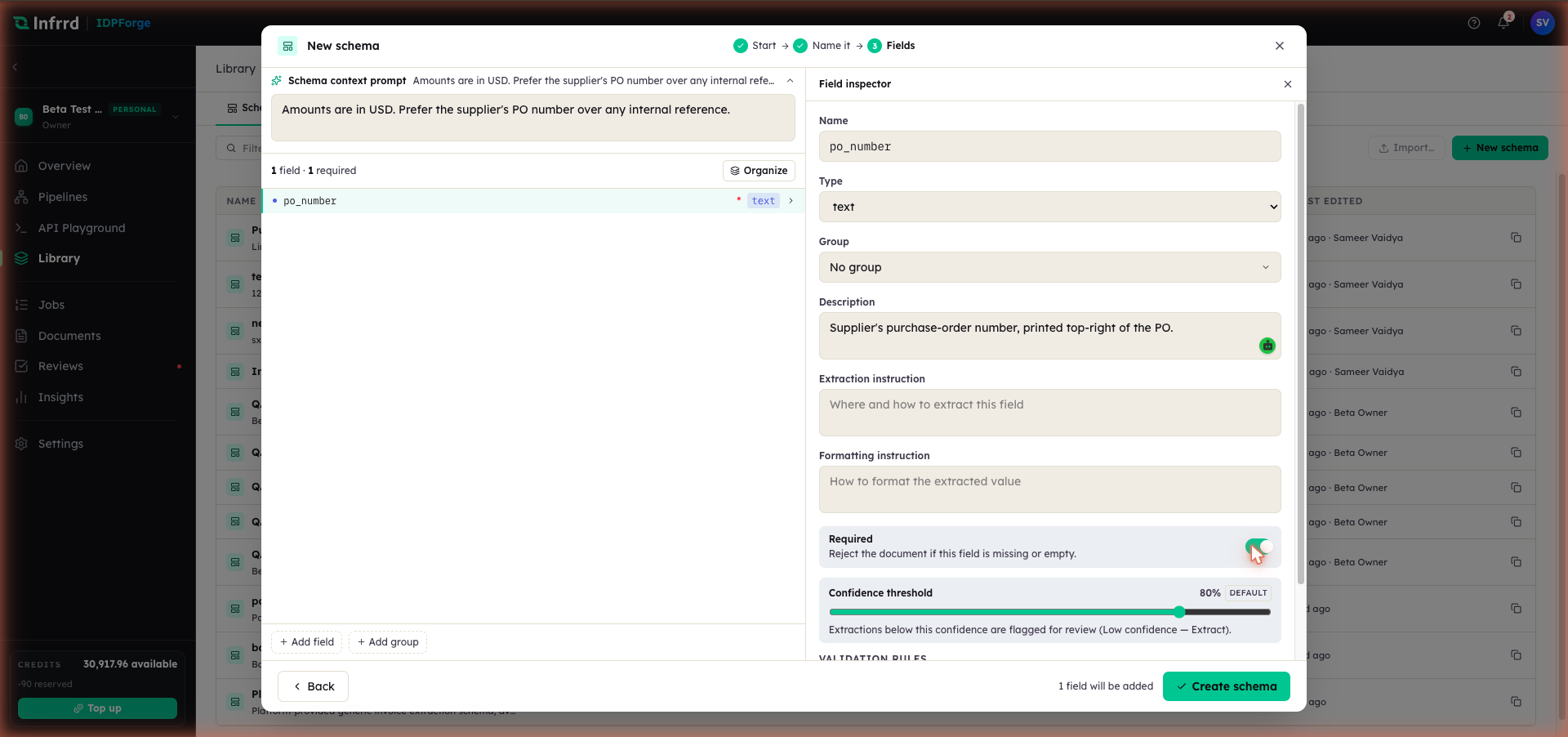
The field inspector exposes the whole per-field contract in one place: type, group, the two instructions, the required flag, and the confidence threshold. The context prompt above the list is the guidance every field inherits.
Tables and repeating groups
A table field extracts repeating rows — the line items on an invoice — with one value per named column, so each row is a record rather than a run of loose values. A group field is saved as a table over its nested fields, so it is extracted the same way.
Separately, the Group a field is assigned to in the inspector is a label, not a type: grouped fields keep their own types and are returned together under that group's name in the extraction output.
Field-level confidence and what drives it
Every extracted value carries a confidence score — the model's own confidence in that value. A value that scores below its threshold is flagged needs_review; a required field that comes back empty is flagged too. The threshold resolves in this order:
- the confidence threshold on the pipeline's Extract stage (Schema Extraction sub-stage), when one is set;
- the field's own confidence threshold;
- the schema's confidence threshold, which applies to every field;
- the platform default, 80%.
The threshold does not fail the job. A flagged value becomes a review task only when the Extract stage's Send exceptions to Reviews switch is on; otherwise the flag travels with the result. See Extract.
Versioning a schema without breaking live pipelines
A schema exists as a draft and as a series of published versions. Publishing snapshots the current fields into an immutable, numbered version; the first publish mints v1, and a schema with no fields cannot be published.
Editing a published schema opens a new working draft and leaves the published version untouched. Extract resolves a published version when each document runs, so draft edits reach pipelines only once they are published. The builder warns when the schema bound to an Extract stage has never been published.
By default a pipeline follows the latest published version, so publishing a new version changes what live pipelines extract from then on. A pipeline can instead be pinned to one published version — through the Version selector on the Extract stage when a single schema is bound, or through the version on the class's schema binding when Classify routes. A pinned version that no longer exists falls back to the latest published one.
Inferring a schema from sample documents
The From a sample document path of the New schema wizard runs a generic Extract pass over the sample and proposes one field for every key-value pair it finds, with the model's confidence and the value as an example. Tables and figures in the sample are not proposed, and proposed fields arrive typed as text; the author sets the real type during review.
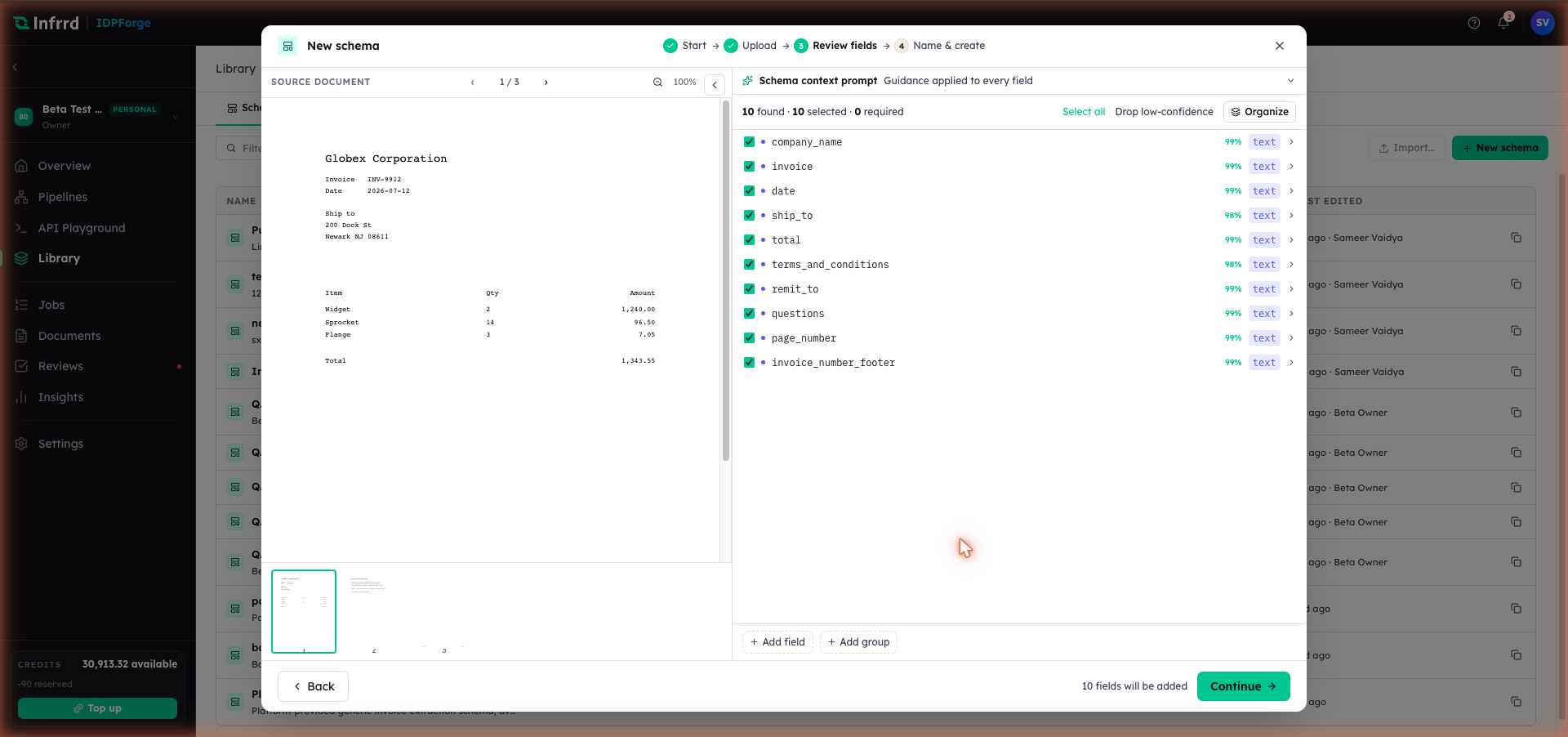
Inference is a proposal, not a commitment. Each proposed field shows its confidence and type against the sample; the author keeps what belongs in the contract and drops the rest — one at a time, or everything under 80% with Drop low-confidence. The result is a draft like any other, versioned from v1 on publish.