Bring your own key
BYOK routes IDPForge's model calls through your own LLM provider account, so the provider bills you for the tokens and IDPForge waives its LLM surcharge on those calls.
What BYOK changes
By default IDPForge runs model calls on IDPForge-managed provider accounts and bills you for them in credits, as the LLM surcharge. With bring your own key (BYOK) you add your own provider keys, and IDPForge routes calls to those providers through your account instead: the provider bills you for the tokens, and IDPForge charges no LLM surcharge on those calls. The flat platform charge, and any Azure Document Intelligence processing a pipeline uses, are still billed in credits.
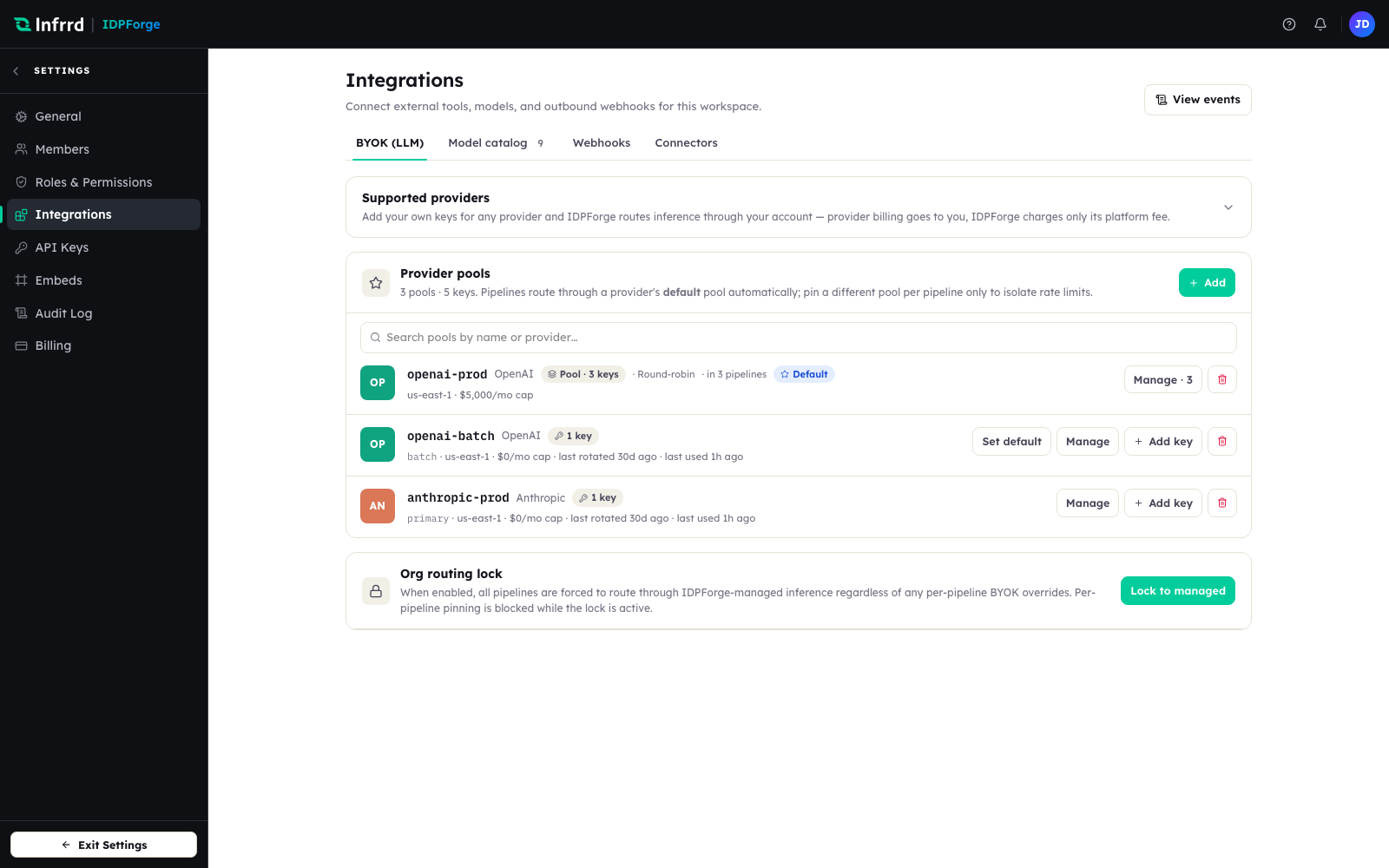
The BYOK (LLM) tab in Settings → Integrations. Each row is a provider pool with its key count, region, and cap; pipelines route through a provider's default pool automatically.
Providers, pools, and keys
BYOK is organised in three layers.
- Provider — OpenAI, Anthropic, Azure OpenAI, AWS Bedrock, Google Gemini (AI Studio), Google Vertex AI, or a custom OpenAI-compatible endpoint.
- Pool — a named group of keys for one provider. Each provider has a default pool that pipelines use unless one is pinned. A pool balances load across its keys — Round-robin or Least-used — and can record a region, a monthly spend cap, and which pipelines may use it: all, none, or specific ones.
- Key — a single provider credential in a pool, with an alias and a status.
A pool row shows what it is doing at a glance: how many keys it holds, its load-balancing strategy, its region, its cap, and how many pipelines route through it; a single-key pool also shows when its key was last rotated and last used.
The monthly spend cap is a budgeting reference. IDPForge shows it on the pool but does not stop calls when it is reached, so keep hard spend limits in your provider account.
Per-call billing
BYOK applies per model call, not per job. A job can touch more than one provider; each call to a provider you have configured uses your key and carries no LLM surcharge, while a call to a provider you have not configured runs on an IDPForge-managed key and is charged in credits. A fully BYOK pipeline shows no LLM surcharge at all.
Fail-closed safety
If a pipeline is configured to use your key for a provider but no usable key is available when a job starts — every key disabled, or the credential cannot be resolved — the job fails and its reserved credits are released, rather than quietly running on IDPForge-managed inference. Failing closed means you are never billed in credits for spend you configured BYOK to self-fund.
Routing controls
- Org routing lock — force every pipeline through IDPForge-managed inference, ignoring any per-pipeline BYOK overrides. Per-pipeline pinning is blocked while the lock is on.
- Per-pipeline pool pin — pin a specific pool for a pipeline, usually to isolate rate limits, rather than using the provider default.
How keys are stored
Provider keys are held as encrypted parameters in AWS Systems Manager Parameter Store; the application database keeps only metadata and a reference, never the secret itself. Keys are stored per workspace, provider, and pool — not per environment — so one set of keys serves the whole workspace.
To add a key, see Add your own LLM key.