The Parse phase
Parse is the stage that reads a document's structure — layout, language, and text — and produces the parsed document: its text as Markdown or plain text, plus the page geometry Extract uses to place values on the page.
What Parse owns
Parse turns a normalized document into a structured reading of the page: where the regions are, what language the text is in, and what the text says. It runs after Initialization and before Split / Classify. Split, Classify, and Extract read the page images rendered during Initialization rather than Parse's text; Extract uses Parse's OCR text blocks and Layout Detection's table regions to place each extracted value on the page. Parse is an umbrella phase: it has no logic of its own, it groups a small set of sub-stages that each answer one question.
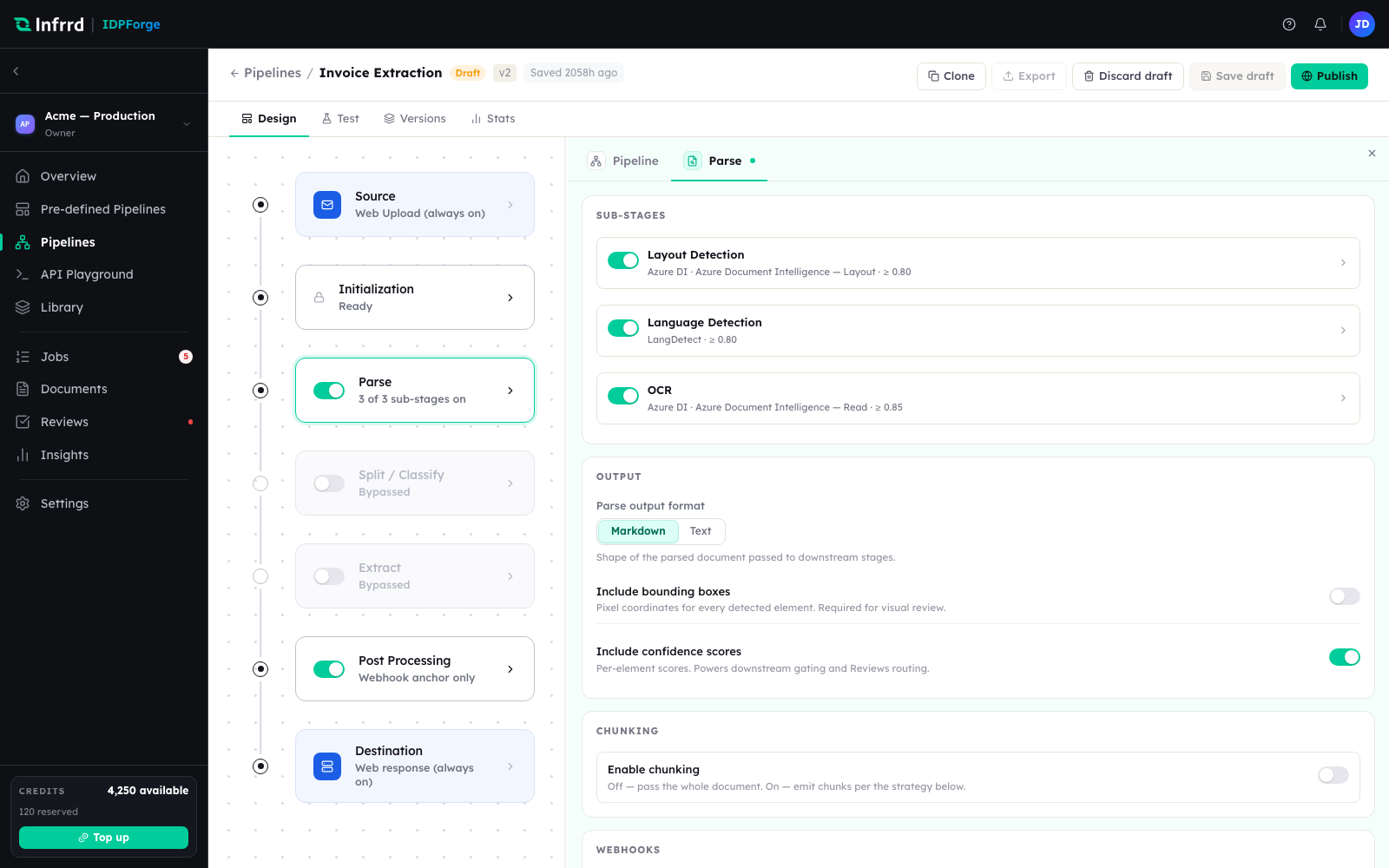
The Parse stage selected in the pipeline builder. The left rail is the stage order; the right panel is the Parse stage's own configuration, open on its three sub-stages.
The Parse sub-stages
Parse carries three sub-stages. Each is toggled independently and carries its own engine, a model where the engine is an LLM, and an optional confidence threshold.
| Sub-stage | Answers | Default engine |
|---|---|---|
| Layout Detection | Where are the regions — blocks, tables, figures — on each page? | Azure Document Intelligence — Layout |
| Language Detection | What language is the document written in? | LLM |
| OCR | What is the text, and where does each token sit on the page? | Azure Document Intelligence — Read |
The counter on the stage card (3 of 3 sub-stages on) reflects how many are enabled. A sub-stage that is turned off is skipped for every document the pipeline runs.
Output
The Parse output format decides the shape of the parsed text: Markdown (the default) preserves structure — headings, tables, lists; Text is a flat transcription.
The Output section also carries two switches, Include bounding boxes (off by default) and Include confidence scores (on by default), which are saved with the stage.
Chunking
Parse can also cut the parsed Markdown into chunks, returned alongside the parse result for retrieval use. Chunking is off by default and does not change what later stages read. When on, the strategy decides where chunks break:
| Strategy | Chunks |
|---|---|
| Semantic (default) | At headings and paragraph breaks, packed up to the token limit. |
| Page | One chunk per page. |
| Fixed token | Fixed-size windows, with an overlap carried into the next chunk. |
Max tokens per chunk (default 1024) caps chunk size; Overlap tokens across chunks (default 128) applies to fixed-token windows. Token counts are an estimate of about four characters per token.
How the stage is configured
Each Parse sub-stage card carries an enabled switch, an engine, a model where the engine is an LLM, and an optional confidence threshold. Entry and exit webhooks can fire around the Parse stage. Like every stage except Initialization, Parse can be bypassed.